
For TurfNet Members (Free)
If you’re a full TurfNet member, posting job listings is completely free. Here’s how:
1. Sign In
Make sure you’re signed in (top right corner).
2. Access New Listing
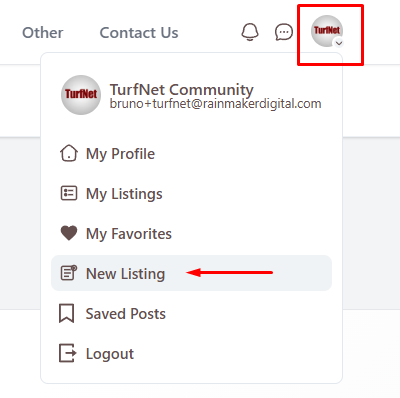
Click your profile icon (top right) and select New Listing from the dropdown menu.
3. Choose Job Listing Type
You’ll see three listing categories. Click Jobs.

4. Complete the Job Details
Fill out the job posting form. You’ll work through several sections:
- Choose a Category (job type)
- Job Details (title, description, employment type)
- Educational Requirements
- Experience Requirements
- Job Benefits
- Special Requirements
- Salary Range
- Availability
- Application Details
- Company Information
Take your time and provide as much detail as possible for the best candidate response.
5. Save & Preview
Click Save & Preview to review how your listing will appear to job seekers.
6. Publish
If everything looks good, click Continue to Publish. Your job listing goes live immediately and will remain active for one year.
For Non-Members ($95 per listing)
If you’re not a TurfNet member, you can still post job listings for $95 each.
1. Register or Sign In
Already have a TurfNet account?
Sign in at the top right.
New to TurfNet?
You’ll need to register for a free guest account first. You’ll receive a verification email to which you must respond to finalize your account. Check your spam folder if you don’t see it within a few minutes.
2. Post Your Job
Once signed in, follow Steps 2-6 from the member instructions above. You’ll be prompted to complete payment ($95) before your listing is published.
You’ll receive a receipt via email after payment.
Managing Your Job Listings
Need to edit, renew, or delete a job listing? Here’s how:
1. Access Your Listings
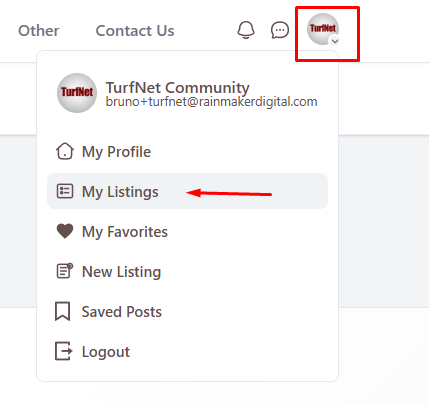
Sign in, click your profile icon (top right), and select My Listings.
2. Find Your Job Listing
You’ll see all your active and expired listings. Find the job listing you want to manage.
3. Edit or Manage
Click Edit next to the listing. Make your changes and save.
Important: Edited job listings will be re-dated to the current date, extending their visibility.
To delete a listing (if the position is filled), click More → Delete.
Why Register to Post a Job?
We require registration so you can:
- Edit listing details anytime
- Renew listings after expiration
- Delete listings when positions are filled
- Track multiple job postings from one account
- Manage everything yourself without contacting support
Upgrade to Full Membership
Not a member yet? Consider upgrading to a full TurfNet membership!
Instead of paying $95 per job listing, become a full member for $295/year and receive:
✓ Unlimited free job postings for 12 months
✓ Free used equipment listings ($99 each for non-members)
✓ Three login accounts (superintendent, assistant, mechanic)
✓ Full TurfNet Forum access for all three accounts
✓ Access to all TurfNet University webinars (live and archived)
The math: One job listing costs $95. Just four listings would cost $380. A full year of membership is only $295 with unlimited postings plus all the other benefits!
Sign Up for Full Membership — Get instant access and start posting free job listings right away.
Job Listing Best Practices
To attract the best candidates:
- Be specific about responsibilities and requirements
- Include salary range when possible
- Highlight benefits and unique opportunities
- Describe your facility and community
- Make application instructions clear
- Keep listings updated — edit if details change
Need Help?
If you encounter any issues, please contact us!
